Without principal propagation, every user sees the data of a single technical account. How identity handover works from BTP into S/4HANA, what you need to configure, and when a different method is the better fit.

Your application on SAP BTP is running. The data comes from S/4HANA. But whose permissions actually apply when someone opens it?
In many integrations the answer is: not the user's own. Every request reaches the ERP under the same technical account, so everyone works with that account's permissions instead of their own. That is not a configuration mistake. It is the default state after the first successful connection test, and it often stays that way.
The key point up front: without principal propagation, your SAP authorization concept is effectively switched off in every cloud application. The technology to fix it is included in the standard and costs no extra license. It simply has to be configured, in three places at once.
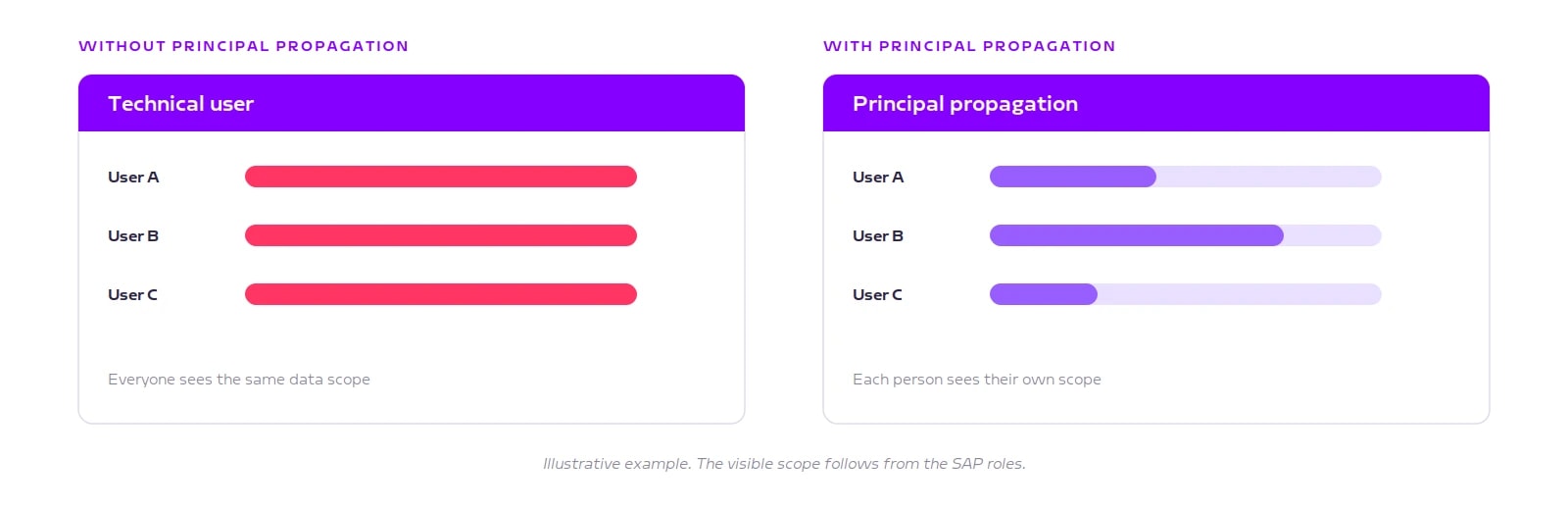
A destination is the configuration object on BTP that defines where a target system sits and how you authenticate against it. In the simplest case it holds a technical user with a password. The ERP then sees the same account on every request, no matter who is sitting in front of the cloud application.
Three consequences that regularly come up in audits:
The authorization concept does not apply. Every user gets whatever permissions the technical account holds. That is almost always too much, and it rarely gets noticed, because the application works.
There is no evidence trail. The Security Audit Log shows a shared account instead of a name. Who triggered a posting can no longer be established.
Segregation of duties cannot be verified. It depends on actions being traceable to individual people. A shared account makes that impossible.
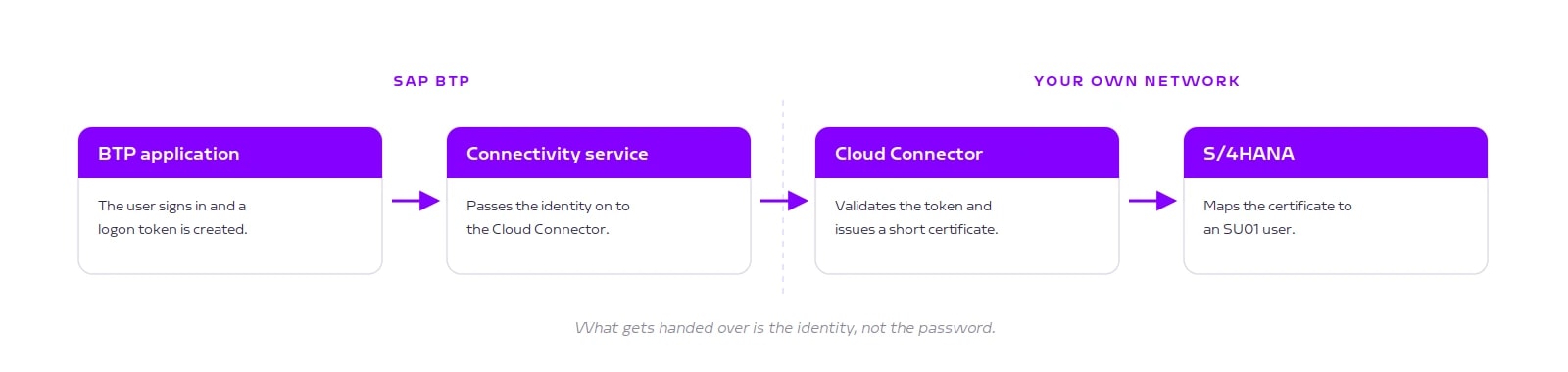
The Cloud Connector is the software you install inside your own network, which opens an outbound, encrypted connection to BTP. It does more than pass data through. It receives the logon token from the cloud, validates it, and issues a short-lived X.509 certificate. That is a digital credential valid for a few seconds only. The ABAP system checks that credential and maps it to an SU01 user.
From that point on, what applies is what was already defined: the user's existing SAP roles. No second authorization concept is created in the cloud that would need ongoing maintenance.
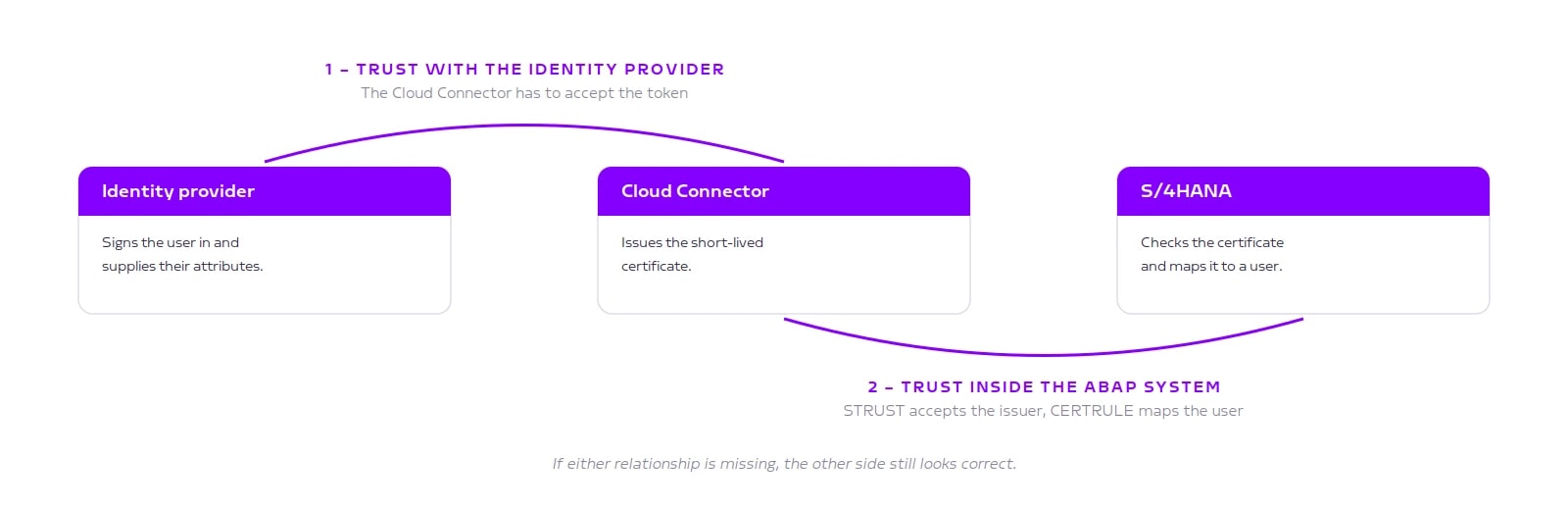
This is why the setup so often stalls. Two independent trust relationships have to be established, and they sit with different teams.
Cloud Connector and identity provider. The identity provider is the system that performs the logon and confirms who the user is, usually SAP Cloud Identity Services. The Cloud Connector has to accept its token and build the certificate from the attributes it supplies.
ABAP system and Cloud Connector. Your S/4HANA system also needs to be configured to accept credentials from this issuer, which takes two settings. In transaction STRUST, the system's certificate store, you add the Cloud Connector certificate to the list of trusted issuers. In transaction CERTRULE you define the rule that derives the matching SU01 user from an attribute in the credential, usually the email address. Both are one-time setup steps. The actual check then runs automatically on every request.
If either relationship is missing, the other side still looks entirely correct on its own. That is exactly where the 403 errors come from when the configuration appears to be right.
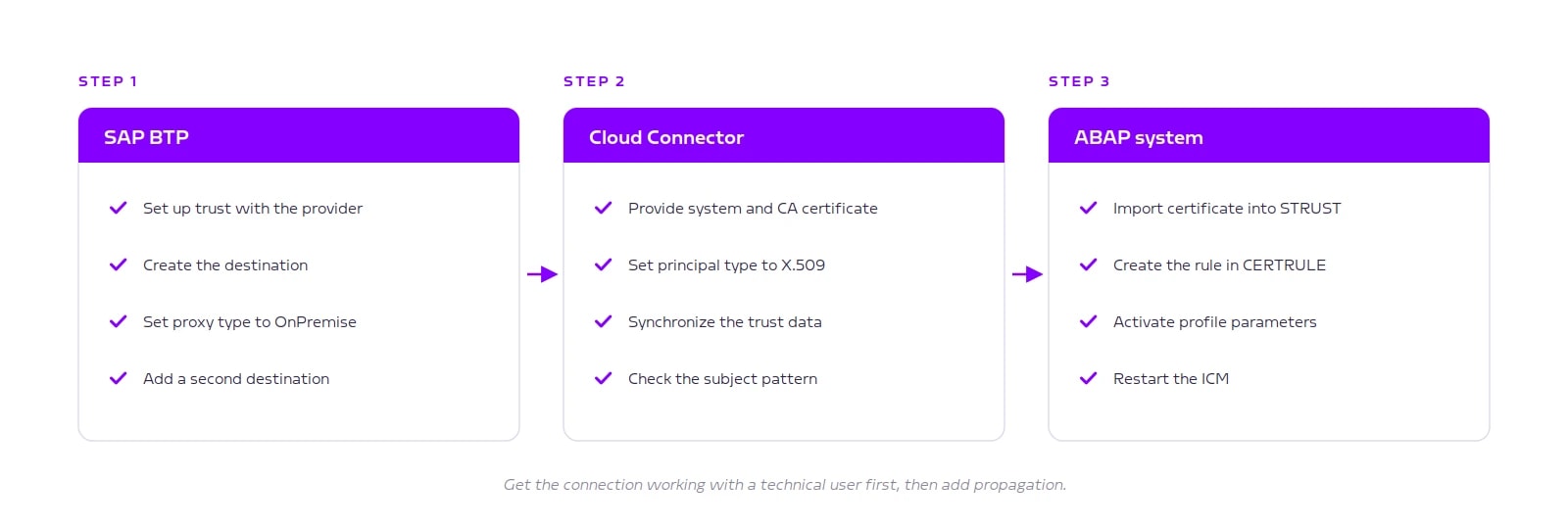
On BTP you set up trust with the identity provider and create the destination with authentication type PrincipalPropagation. In the Cloud Connector you generate the certificates, set the principal type to X.509, and synchronize the subaccount trust data. In the ABAP system you import the certificate into STRUST, create the mapping rule in CERTRULE, and set the related profile parameters.
Two points that save considerable time in our projects:
Create two destinations. One with a technical user, one with principal propagation. When something fails, you can immediately tell whether the connection itself is broken or only the identity handover.
Copy certificate values, do not retype them. Attribute notation is not consistent: the Cloud Connector displays the email attribute as EMAIL, while CERTRULE shows only the technical identifier. Retyping here means hours of troubleshooting afterwards.
In one scenario the decision has already been made for you: SAP Build Work Zone. If you surface Fiori applications from an S/4HANA system there, SAP's integration guide explicitly prescribes principal propagation. The reason becomes clear once you look at the two connections Work Zone needs. One fetches the structure of tiles and roles once and may run under a technical user. The other calls the application when an employee clicks a tile. If that second connection ran under a technical user, every employee would see identical data in the launchpad. A launchpad without principal propagation is not a personal workplace but a shared account.
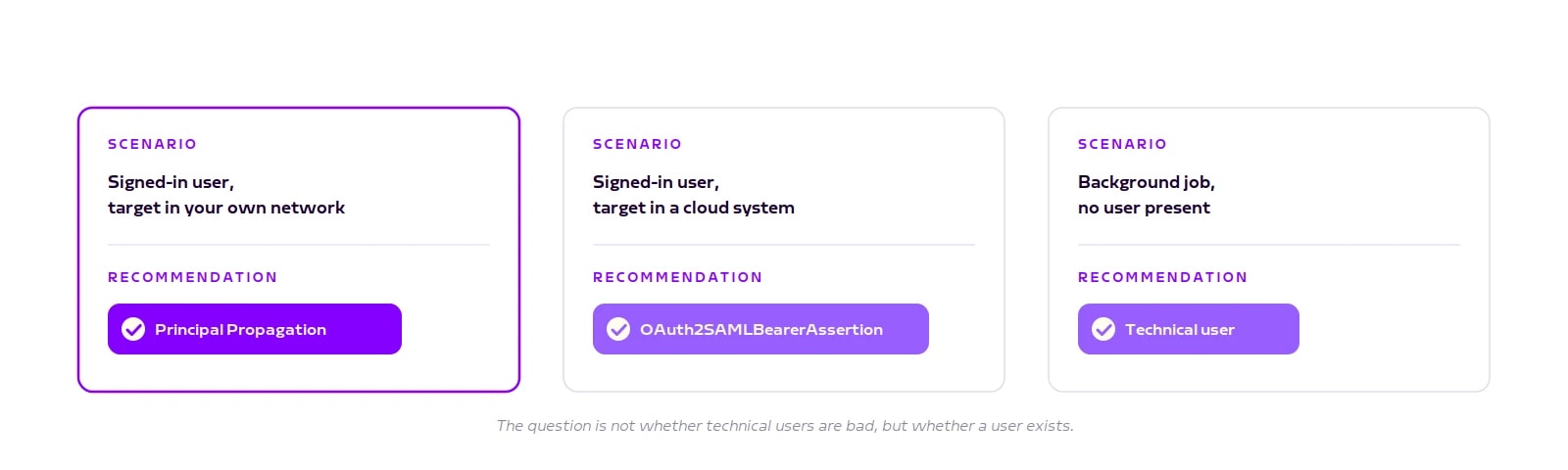
More generally, principal propagation requires a logged-in user at runtime. A nightly background job or a pure system integration has no such identity. There a technical user is the correct choice, but secured through OAuth or a certificate instead of a password stored in the destination.
If your target is not your own data centre but another cloud system, a different method applies: OAuth2SAMLBearerAssertion. Here the identity travels as a signed message the target system can verify, rather than as a certificate. No Cloud Connector is needed for that.
Things get more demanding if you connect through RFC instead of HTTPS. RFC is the older, SAP-specific connection method that many existing integrations still use. There SAP supports only the route via X.509 certificates, and the connection additionally has to be encrypted through SNC. SNC stands for Secure Network Communication and is the encryption SAP provides for RFC connections. If your target service is also available as an OData interface, meaning through regular web access, that route is usually the simpler one.
So the question is not whether technical users are bad in principle. It is this: is there a real person whose permissions should apply?
In our experience the effort rarely sits in the technology. It sits in one unglamorous question: is the linking attribute, usually the email address, maintained completely and uniquely in both the cloud and the SU01 master record? In systems that have grown over years the answer is almost always no. Legacy accounts without an address, duplicates, credentials with no person behind them.
The second point concerns operations. Several certificates hang off this chain, each with its own validity period. Some can be renewed automatically, others cannot. Without monitoring of the expiry dates, the integration will eventually stop without warning.
Principal propagation is not an add-on. It is the precondition for your authorization concept to apply to cloud applications as well, and for SAP Build Work Zone it is a fixed part of the standard setup. The effort stays manageable if the sequence is right and the master data is clean. Both can be clarified in advance.
Book a call
We look at your scenario and tell you which method fits, how much setup effort to expect in your case, and what your security and Basis teams should check before sign-off.
Send us a note or book a short meeting.
